
Fixed Lots Throughout
Every trade uses the same lot size, with no doubling or larger lots as losses grow. Lot size is calculated automatically from mode and balance, and stays the same throughout each cycle.
MT5 Gold EA · Fixed Lots
Fixed Lots, Daily Trades,
Daily Rebates
Gold only. Opens long and short positions at the same time, using the same lot size for every trade and closing for small profits.

11/2 update · 1.07 Modes are now Relaxed at 50,000 / Comfort at 30,000 (default, recommended) / Aggressive at 20,000 (balance per 0.01 lots; the same figures are in cents for cent accounts). Enjoy has been removed. Accounts previously using Enjoy will automatically run Comfort. Stay connected when upgrading, and wait for the panel to show "License Valid" before leaving.
Every trade uses the same lot size, with no doubling or larger lots as losses grow. Lot size is calculated automatically from mode and balance, and stays the same throughout each cycle.
Trades only gold, opening both long and short positions and closing trades as prices move back and forth. A demo account closed 263 trades over 5 trading days.
Frequent trades with the same lot size provide consistent trading volume. On a rebate account, each closed trade adds another rebate.
An account protection threshold pauses trading when triggered, with automatic resumption the next day. No new trades open before Friday's market close, and trading pauses during sharp market moves.
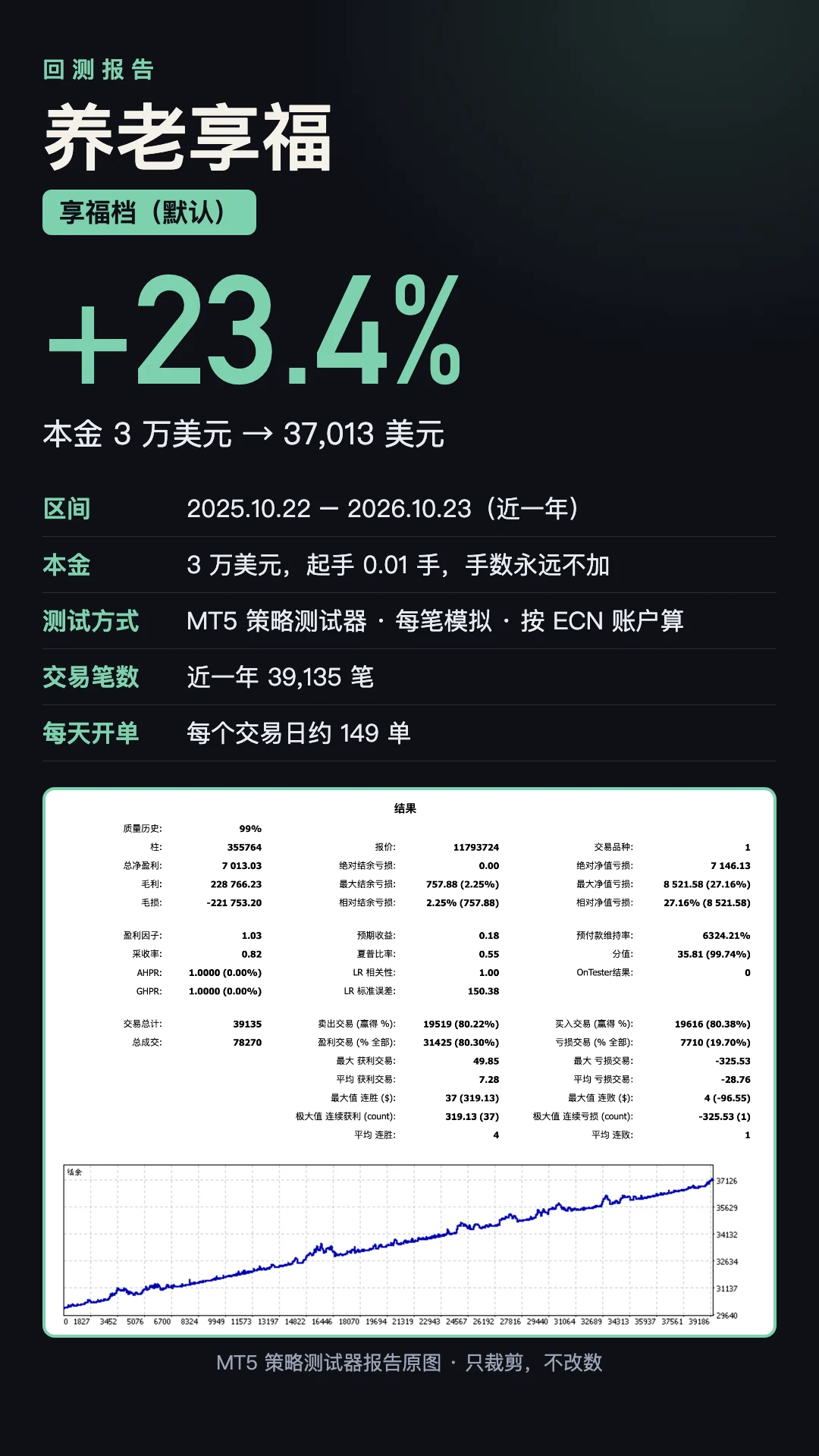
2025.10.22 – 2026.10.23 · Starting capital $30,000, 0.01 lots per trade · MT5 Strategy Tester, Every tick · Based on an ECN account
All three modes use the same strategy; only lot size differs. Lot size scales automatically with balance. For cent accounts, the same figures are in cents: Comfort starts at 30,000 cents (about $300), and Aggressive at 20,000 cents (about $200).
Per 0.01 Lots
$50,000
Cent account: 50,000 cents (about $500)
Most Capital per Lot, Least to Manage
Per 0.01 Lots
$30,000
Cent account: 30,000 cents (about $300)
The Default and Most Popular Mode
Per 0.01 Lots
$20,000
Cent account: 20,000 cents (about $200)
Larger Trades With the Same Capital
| Modes | Dollar Account · Per 0.01 Lots | Cent Account · Per 0.01 Lots | Notes |
|---|---|---|---|
| Relaxed | $50,000 | 50,000 cents (about $500) | Most Capital per Lot, Least to Manage |
| ComfortRecommended | $30,000 | 30,000 cents (about $300) | The Default and Most Popular Mode |
| Aggressive | $20,000 | 20,000 cents (about $200) | Larger Trades With the Same Capital |
Example: in Comfort mode, a dollar account with a 60,000 balance trades 0.02 lots per trade; a cent account with 30,000 cents trades 0.01 lots per trade. If unsure, use the default "Comfort" mode.
In brief: trades only gold, opens both long and short positions, and uses the same lot size for every trade, closing for small profits. Uses earlier profits to reduce the oldest losing position. In a one-way market, new trades follow the trend only. An account protection threshold pauses trading when triggered, with automatic resumption the next day.
Attach it to an XAUUSD chart. It opens long and short positions together, with the same lot size for every trade.
Each trade has a small take profit target and closes when price reaches it, realizing profits one trade at a time.
Profits from earlier closed trades accumulate in a profit pool and are used to close the oldest losing position, reducing open exposure.
When the market moves persistently in one direction, new trades follow that direction, with only a few positions remaining against the trend.
An account protection threshold pauses trading when triggered. Trading resumes automatically the next day, with no manual restart needed.
Demo account test, 10/19–10/23 (Steady Yield A1 rules, starting capital $5,000, 0.01 lots per trade).
Net realized profit includes losing trades and commissions, and excludes rebates.
Licence
One license covers one MT5 account. Dollar and cent accounts are supported. Updates are free while the license is valid.
@hypermatch123For use after activating your license. Attach it to a gold chart, select a mode, and paste the activation key into the panel.
Download the EA (.ex5)Contact support for a 24-hour trial key. One trial per MT5 account, on demo or live accounts. It is the same EA as the full version; just replace the key to switch.
Download Free Trial VersionInstallation, URL permissions, mode selection, activation, and panel messages, explained in two pages.
Download User GuideIn MT5, go to "File → Open Data Folder", place the EX5 file in MQL5/Experts/, and refresh the Navigator.
Go to "Tools → Options → Expert Advisors", check "Allow WebRequest for listed URL", and add the URL below.
https://yl.eaea.aiDrag it onto an XAUUSD (or GOLD) chart, enable Algo Trading, and select a mode in "Inputs" (Comfort by default).
Paste an activation key or trial key into the panel. It starts running when "License Valid" appears.
Contact support on Telegram @hypermatch123 and say "Steady Yield Trial" or "Steady Yield Full Version". Send your MT5 account details privately to support, not in public groups.
@hypermatch123A gold EA running on MT5. It opens long and short positions together, uses the same lot size for every trade, and closes for small profits. Designed to run long term.
From 39U/month or 99U for 3 months, paid in USDT on NBlab; the key is delivered automatically. One license covers one MT5 account.
Three modes based on balance per 0.01 lots: Relaxed at 50,000, Comfort at 30,000 (default), and Aggressive at 20,000. For cent accounts, the same figures are in cents, so Aggressive starts at 20,000 cents (about $200). If unsure, use Comfort.
An MT5 account trading gold (XAUUSD, GOLD, and common suffixes are recognized automatically). Dollar and cent accounts are supported.
Yes. The free trial version uses a 24-hour trial key, once per MT5 account. It supports demo and live accounts, including cent and standard accounts. It is the same EA with the same features as the full version; just replace the key to switch. Contact support on Telegram @hypermatch123 for a trial key.
The EA runs inside MT5 and only works while MT5 is open. Take profit, position reduction, and account protection all require the EA to be online; they do not operate when disconnected, when MT5 is closed, or when the market is closed. Keep it online 24 hours a day on a VPS.
Clients simply choose a mode. Strategy parameters are delivered encrypted from the cloud; their values are not shown in the panel. Switch modes for a different style, or ask support to assign one.
Support: Telegram @hypermatch123. Include your terminal version, the steps you took, and the panel message. Hide personal information unrelated to troubleshooting before sharing screenshots.